import numpy as npimport sympy as spimport matplotlib.pyplot as pltfrom sympy import plot_parametric, symbolsfrom IPython.display import display, Markdownfrom functools import partial## This is a 'partial function' so that we don't have to set figure size and aspect ratio every time.splot = partial(plot_parametric, aspect_ratio = (1,1),size=(4,4),axis_center = (0,0))def _plotter(x, y, create =False):if create: plt.figure(figsize=(6, 6)) plt.plot(x, y) plt.gca().set_aspect('equal', adjustable='box')returndef _centeraxes(): ax = plt.gca()# Move left y-axis and bottom x-axis to centre, passing through (0,0) ax.spines['left'].set_position('zero') ax.spines['bottom'].set_position('zero')# Eliminate upper and right axes ax.spines['right'].set_color('none') ax.spines['top'].set_color('none')# Show ticks in the left and lower axes only ax.xaxis.set_ticks_position('bottom') ax.yaxis.set_ticks_position('left')returndef _displayM(text, expr):""" Display text and expression inline. """ display(Markdown('{}{}'.format( text, sp.latex(expr, mode='inline') )) )
In Cartesian
Parabola
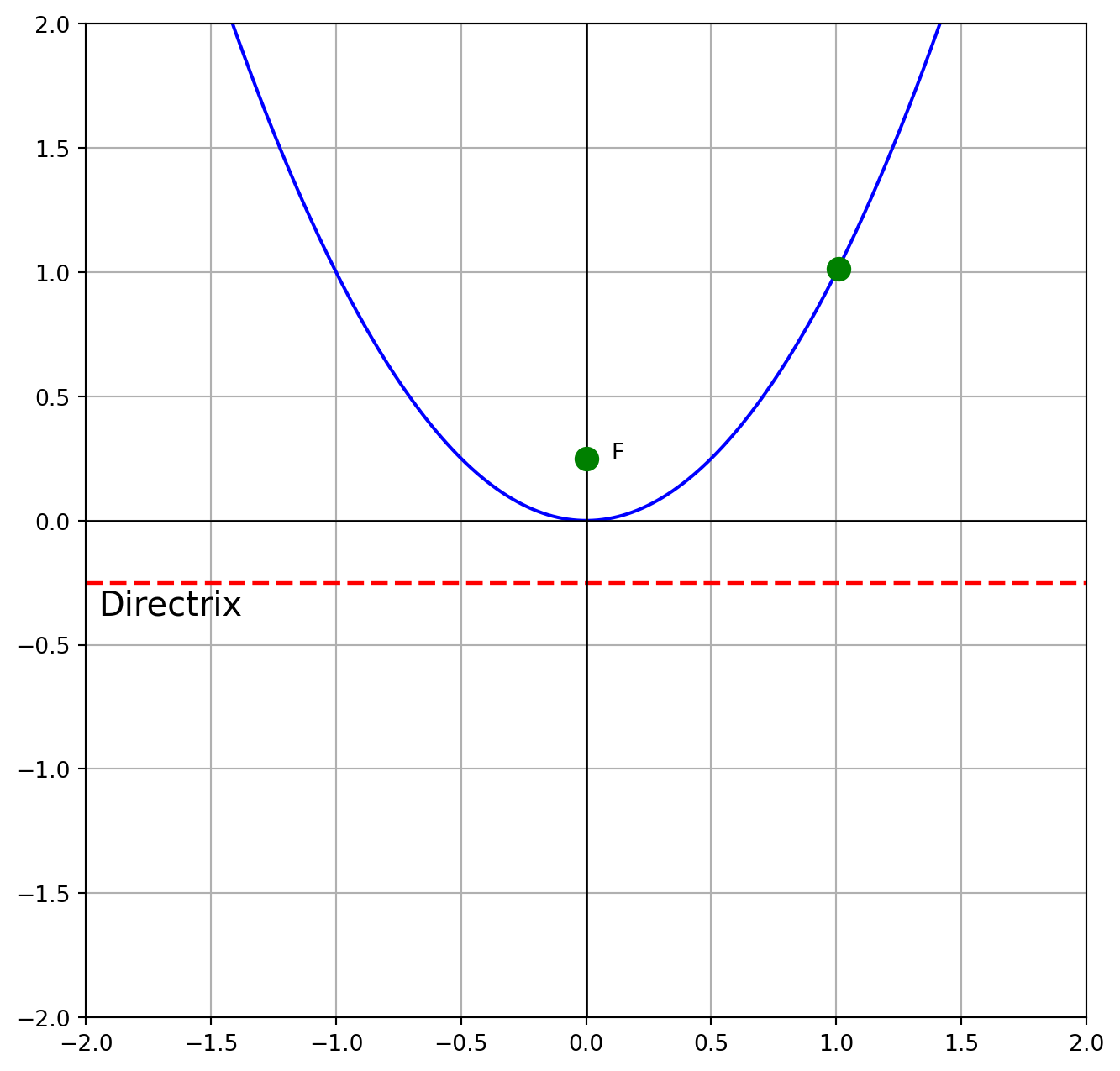
%matplotlib inlineimport numpy as npimport matplotlib.pyplot as pltdef conic(x, tp ='parabola', p = {}):""" x = values at which to compute tp = type of conic p = parameters """if tp =='parabola': y = p['a'] * (x - p['h'])**2+ p['k'] focus = {'x': p['h'], 'y': p['k'] +1/(4* p['a'])}if tp =='circle': circle_x = p['c_x'] + p['r'] * np.cos(x) circle_y = p['c_y'] + p['r'] * np.sin(x)return circle_x, circle_yreturn y, focus## Generate parabolax = np.linspace(-2, 2, 400)params = {'a': 1, 'h': 0, 'k': 0}y, focus = conic(x, 'parabola', p = params)## Point of observationind =300pb_x, pb_y = np.abs(x[ind]), np.abs(y[ind])# Plotplt.figure(figsize=(8, 8))plt.plot(x, y, label='$y = x^2$', color='blue')plt.scatter(focus['x'], focus['y'], color='green', zorder=5, s=100)plt.text(focus['x'] +0.1, focus['y'], 'F')plt.text(focus['x'] -1.95, -focus['y']-0.13, 'Directrix', fontsize=15)plt.scatter(pb_x, pb_y, color='green', zorder =3, s =100)## Plot settingsplt.xlim(-2, 2)plt.ylim(-2, 2)plt.grid(True)plt.axhline(-focus['y'], color='red', linewidth=2, ls ='--')plt.axhline(0, color='black', linewidth=1)plt.axvline(0, color='black', linewidth=1)#__________________________________________#==================================### DO NOT DELETE (Uncomment to show circles)#==================================# ##=============== Circles # radius = np.sqrt((focus['x'] - pb_x)**2 + (focus['y'] - pb_y)**2)# theta = np.linspace(0, 2 * np.pi, 400)# ## Circle A# params = {'c_x': focus['x'], 'c_y': focus['y'], 'r': radius}# theta = np.linspace(0, 2 * np.pi, 400)# circle_x, circle_y = conic(theta, 'circle', p = params)# plt.plot(circle_x, circle_y, color='red')# ## Circle B# params = {'c_x': pb_x, 'c_y': -focus['y'], 'r': radius}# circle_2x, circle_2y = conic(theta, 'circle', p = params)# plt.plot(circle_2x, circle_2y, color='red')# ## Lines# plt.plot([pb_x, pb_x], [-focus['y'], pb_y], '--') #vertical dashed line# plt.plot([0, pb_x], [focus['y'], pb_y], '--') #line from focus to parabola #__________________________plt.show()
We can animate the circles to show how the distances from the focus to a point on the parabola, and a circle on directrix directly under the parabola are the same.
Parabola Animation
import numpy as npimport matplotlib.pyplot as pltfrom matplotlib.animation import FuncAnimationfrom IPython.display import HTML# Use the notebook backend for interactive plots%matplotlib notebook# Set up the figure and axesfig, ax = plt.subplots(figsize = [4,4])xdata, ydata = [], []circleA, = plt.plot([], [], 'r-')circleB, = plt.plot([], [], 'r-')point, = plt.plot([], [], 'bo', zorder =10, markersize =10)linev, = plt.plot([], [], '--') #vertical dashed linelinef, = plt.plot([], [], '--') #line from focus to parabola # Initialize the plotdef init(): ax.set_xlim(0, 2* np.pi) ax.set_ylim(-1, 1)#Create parabola, foci etc. ## Generate parabola x = np.linspace(-2, 2, 400) params = {'a': 1, 'h': 0, 'k': 0} y, focus = conic(x, 'parabola', p = params)## Plot Focus plt.plot(x, y, label='$y = x^2$', color='blue') plt.scatter(focus['x'], focus['y'], color='green', zorder=5, s=80) plt.text(focus['x'] +0.1, focus['y'], 'F')## Plot settings plt.xlim(-2, 2) plt.ylim(-2, 2) plt.grid(True) plt.axhline(-focus['y'], color='black', linewidth=1) plt.axvline(0, color='black', linewidth=1)return plt# Update function for animationdef update(frames):## Point of observation ind = frames pb_x, pb_y = np.abs(x[ind]), np.abs(y[ind]) point.set_data(pb_x, pb_y)##=============== Circles radius = np.sqrt((focus['x'] - pb_x)**2+ (focus['y'] - pb_y)**2) theta = np.linspace(0, 2* np.pi, 400)## Circle A params = {'c_x': focus['x'], 'c_y': focus['y'], 'r': radius} circle_x, circle_y = conic(theta, 'circle', p = params) circleA.set_data(circle_x, circle_y)## Circle B params = {'c_x': pb_x, 'c_y': -focus['y'], 'r': radius} circle_2x, circle_2y = conic(theta, 'circle', p = params) circleB.set_data(circle_2x, circle_2y)##============== Lines linev.set_data([pb_x, pb_x], [-focus['y'], pb_y]) linef.set_data([0, pb_x], [focus['y'], pb_y])return# Create the animationani = FuncAnimation( fig, update, frames=list(range(200)), init_func=init, blit=True, interval=20)# Display the animationHTML(ani.to_html5_video())
/tmp/ipykernel_23069/2707575446.py:50: MatplotlibDeprecationWarning:

Setting data with a non sequence type is deprecated since 3.7 and will be remove two minor releases later
Ellipse
Warning: The code below needs tweaking.
import numpy as npimport plotly.graph_objects as gofrom plotly.subplots import make_subplots# Function to generate ellipse pointsdef generate_ellipse(a, e, num_points=100): b = a * np.sqrt(1- e**2) # semi-minor axis theta = np.linspace(0, 2* np.pi, num_points) x = a * np.cos(theta) y = b * np.sin(theta)return x, y# Initial parameterseccentricity =0.5semi_major_axis =1num_points =100# Create initial ellipsex, y = generate_ellipse(semi_major_axis, eccentricity)# Create the figure and add the initial ellipsefig = make_subplots(rows=1, cols=1)fig.add_trace(go.Scatter(x=x, y=y, mode='lines', name='Ellipse'))# Set fixed axis limitsfig.update_layout( title=f'Ellipse with Semi-Major Axis = {semi_major_axis}, Eccentricity = {eccentricity:.2f}', xaxis_title='X', yaxis_title='Y', xaxis=dict(scaleanchor="y", range=[-2, 2]), yaxis=dict(constrain='domain', range=[-2, 2]), showlegend=False)# Create sliders for eccentricity and semi-major axisfig.update_layout( sliders=[ {'active': 0,'yanchor': 'top','xanchor': 'left','currentvalue': {'prefix': 'Eccentricity: ','visible': True,'xanchor': 'right' },'pad': {'b': 10},'len': 0.9,'x': 0.1,'y': -0.1,'steps': [{'label': f'{i/100:.2f}','method': 'update','args': [{'x': [generate_ellipse(semi_major_axis, i/100)[0]], 'y': [generate_ellipse(semi_major_axis, i/100)[1]]}, {'title': f'Ellipse with Semi-Major Axis = {semi_major_axis}, Eccentricity = {i/100:.2f}'}] } for i inrange(0, 101, 10)] # Eccentricity steps }, {'active': 0,'yanchor': 'top','xanchor': 'left','currentvalue': {'prefix': 'Semi-Major Axis: ','visible': True,'xanchor': 'right' },'pad': {'b': 10},'len': 0.9,'x': 0.1,'y': -0.3,'steps': [{'label': f'{i/10:.1f}','method': 'update','args': [{'x': [generate_ellipse(i/10, eccentricity)[0]], 'y': [generate_ellipse(i/10, eccentricity)[1]]}, {'title': f'Ellipse with Semi-Major Axis = {i/10:.1f}, Eccentricity = {eccentricity:.2f}'}] } for i inrange(1, 21)] # Semi-major axis steps from 0.1 to 2.0 } ])# Show the figurefig.show()